
A barcode label carries a number a person can read and a scanner can see. An RFID label carries data a reader can capture in milliseconds — without line of sight, without unstacking a pallet, without a human aiming at anything. But the label still has to be printed, and the chip still has to be encoded before it ships. That is exactly the job of a UHF RFID label printer: one desktop machine that prints the barcode, the text, and the logo, and writes the electronic data into the tag’s chip in the same pass.
In this guide we break down what a UHF RFID label printer actually does, where it earns its place on a production floor, and how the two RFIDSU models — X1D and X1iD — differ so you can match the machine to the job instead of guessing.
In this article
- What Is a UHF RFID Label Printer?
- Why Print-and-Encode in One Pass Matters
- Why Choose RFIDSU’s UHF RFID Label Printer
- Frequently Asked Questions
1. What Is a UHF RFID Label Printer?
A UHF RFID label printer is a desktop thermal label printer with an integrated UHF RFID reader/encoder built into the media path. It prints the visible label and writes data to the embedded RFID inlay at the same time, in a single pass. Instead of printing labels on one machine and encoding tags on another — a slow, error-prone two-step workflow — the printer produces a finished, ready-to-apply RFID label in one operation.
The printer works with UHF EPC Gen 2 / ISO 18000-6C tags, the global standard for supply-chain and asset-tracking RFID. It supports three operational modes so it can flex with your workflow: print while RFID reading/writing, print only, or RFID reading/writing only.
At a practical level, a print-and-encode cycle runs through four steps:
- Print — thermal printhead produces the human-readable text, barcode, QR, or logo using direct thermal or thermal transfer printing.
- Encode — the built-in reader/encoder writes the EPC or user-memory data into the tag’s chip as the label advances.
- Verify — the printer reads back the tag to confirm the data was written correctly.
- Mark — any bad label (failed write) is automatically flagged so it can be removed before it reaches the customer.
RFIDSU’s UHF RFID Label Printer ships in two models: X1D (203 DPI, 8 IPS — built for high-volume output) and X1iD (300 DPI, 6 IPS — built for finer print quality and dense barcodes).
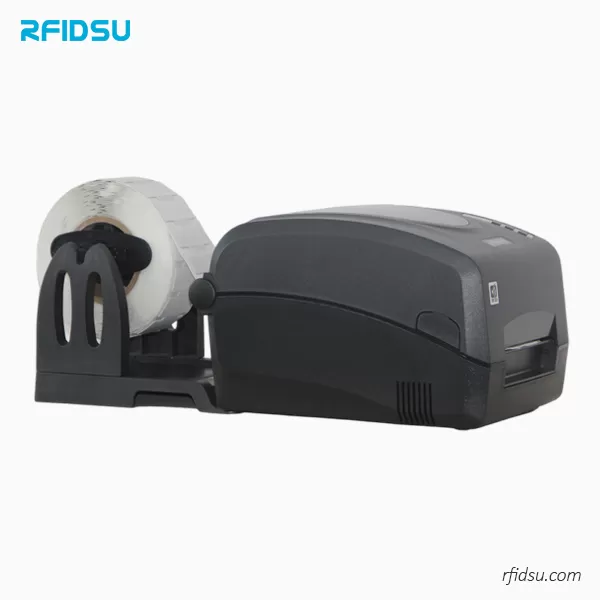
UHF RFID Label Printer — a desktop print-and-encode unit that writes EPC data and prints the label in a single pass, with optional RJ45 network card and peeler.
2. Why Print-and-Encode in One Pass Matters
An RFID label is only as useful as the data inside its chip. If the EPC doesn’t match the printed barcode, a scan produces a mismatch, and a shipment goes to the wrong dock. Printing and encoding on one machine collapses those two steps into one verified pass — which is why this class of printer shows up wherever tags are produced at volume.
Retail & inventory management
Retailers print and encode item-level RFID labels for product tracking, stock counting, and supply-chain visibility. One pass produces a shelf-ready label with both a scannable barcode and a unique EPC, so store staff can count a whole rack in seconds.
Asset tracking — including on-metal
IT equipment, tools, machinery, and fixed assets need durable RFID tags. RFIDSU’s printer supports media up to 1.5 mm thick including liner, making it fully compatible with flexible on-metal RFID labels — the tags that let you mark metal surfaces without the read-range collapse that plagues ordinary labels on metal.
Warehouse logistics & manufacturing
Shipping labels, pallet tags, and inventory labels with embedded RFID support automated receiving and outbound tracking. On the production floor, the same printer produces work-in-process tags, quality-control labels, and product identification with encoding built in.
Healthcare, pharma, library & archive
Medication labels, specimen tags, medical-device tracking, RFID book labels, and archive tags all benefit from the same single-pass workflow — print the compliance text and encode the ID together, verified before application.
A UHF RFID label printer is not the same class of device as a plain barcode printer or an NFC encoding tool. A barcode printer prints only — it cannot write to a chip. An NFC tool writes to one tag at a time and is not built for high-volume label rolls. A UHF RFID label printer does both jobs at production speed: it prints at up to 8 IPS and encodes every label on the roll, on the fly.
3. Why Choose RFIDSU’s UHF RFID Label Printer
Not every RFID printer is built for real production. The difference between a machine that keeps up with a roll of tags and one that stalls on misreads comes down to the encoder, the calibration, and the error handling. RFIDSU’s UHF RFID Label Printer is engineered around six concrete advantages.
1. Two models — speed or resolution, your call
The X1D delivers 203 DPI at a maximum print speed of 8 IPS (203.2 mm/s) for high-volume production. The X1iD delivers 300 DPI at 6 IPS (152.4 mm/s) for applications that need finer detail and crisper dense barcodes. Both share the same 4.6 in max media width and the same RFID engine — you choose the trade-off that fits the job.
2. Integrated high-performance RFID encoding
A built-in reader/encoder works with EPC Gen 2 / ISO 18000-6C tags. It can read a tag ID, convert it to text or a barcode, and print it on the label while writing specified data back to the tag — all in one verified pass.
3. On-metal media up to 1.5 mm
Media thickness support from 0.06 mm to 1.5 mm including liner means the printer handles flexible on-metal RFID labels as well as standard paper, synthetic, die-cut, continuous, fan-fold, tags, and tickets — without a second machine.
4. Intelligent error prevention
A learning algorithm avoids misreading, miswriting, rereading, and rewriting. Bad labels are automatically marked so defective tags never slip into a shipment — a safeguard that matters most when labels are being produced in thousands.
5. One-button auto-calibration
Auto-calibration, combined with a computer-based visual RFID calibration tool, sets the right parameters for each media type quickly and without manual trial-and-error — so switching from a paper label to an on-metal tag is fast, not fiddly.
6. Full specification and connectivity
Dual printing method (direct thermal and thermal transfer with Wax, Wax/Resin, or Resin ribbons), 8 MB Flash / 16 MB SDRAM, RS-232 and USB 2.0 as standard, and optional RJ45 network card and label peeler. The compact chassis measures W208 × D310 × H195 mm and weighs 2.62 kg, powered by 24 VDC / 2.0 A. It supports 1D barcodes (Code 39, Code 128, EAN, UPC, and more) and 2D codes (Data Matrix, PDF417, QR) alongside the RFID data.
4. Frequently Asked Questions
What is the difference between the X1D and X1iD models?
X1D offers 203 DPI resolution with a maximum print speed of 8 IPS (203.2 mm/s), ideal for high-volume production. X1iD provides higher 300 DPI resolution at 6 IPS (152.4 mm/s), suitable for finer print quality and detailed barcodes.
Can this printer handle UHF RFID flexible on-metal labels?
Yes. The printer supports media thickness up to 1.5 mm including liner, making it fully compatible with UHF RFID flexible on-metal labels — for asset tracking and industrial applications on metal surfaces.
What types of RFID tags are compatible?
The printer supports UHF EPC Gen 2 and ISO 18000-6C compatible tags, including standard paper labels, synthetic labels, and flexible on-metal tags up to 1.5 mm thickness.
Can the printer read and write RFID data at the same time as printing?
Yes. It supports three modes: print while RFID reading/writing, print only, or RFID reading/writing only. It can read tag IDs, convert them to text or barcodes, and print them on the label while writing specified data to the tag.
What is the auto-calibration feature?
The one-button auto-calibration function, combined with the computer-based visual RFID calibration tool, allows quick and easy parameter setting for all label types without manual adjustment, ensuring optimal read/write performance.